Description
MIT Sloan offers Claude Enterprise to all full-time Sloan students, faculty, and eligible lecturers for academic and research use. It provides enterprise-grade security and privacy protections, along with access to Claude Cowork and Claude Code.
With Claude, you can:
- Chat with Claude to draft and revise content, analyze information, brainstorm ideas, conduct research, and work with uploaded files.
- Use Claude Cowork to complete more complex, multi-step tasks that involve working across files, documents, and tools.
- Use Claude Code for coding and development tasks, including writing, reviewing, debugging, and working with codebases.
Claude can be accessed through a web browser or the desktop app.
Who Can Use It
Students
Full-time MIT Sloan students automatically receive a Claude Enterprise Standard Account at no charge.
Standard Account: Approximately 2.5x the usage of a Claude Pro account.
Cross-registered students do not receive a Claude Enterprise account through MIT Sloan. All MIT students, including cross-registered students, can access Claude and other AI models through Parley.
Faculty and Lecturers
MIT Sloan faculty and lecturers with a 50% or greater appointment are eligible for a Claude Enterprise account. Complete the Claude Account Faculty Intake Form to select an account option.
- Standard Account: No charge; approximately 2.5x the usage of a Claude Pro account.
- Premium Account: A cost object is required; approximately 5x more usage than Standard.
- No Account: Opt out of receiving a Claude Enterprise account.
Students: No action is required. Eligible full-time MIT Sloan students receive a Standard Account automatically.
Faculty and Lecturers: Complete the Claude Account Faculty Intake Form to select an account option. Teaching accounts will begin provisioning on or before September 9, 2026.
Follow these steps to sign in to Claude:
- Go to claude.ai or open the Claude Desktop app.
- Enter your full MIT email address (e.g., username@mit.edu) [1] and click Continue with SSO [2].
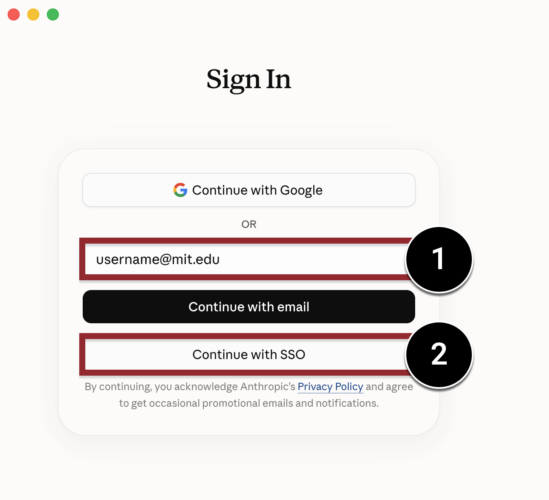
- When prompted, sign in with your MIT username and password, then complete two-factor authentication.
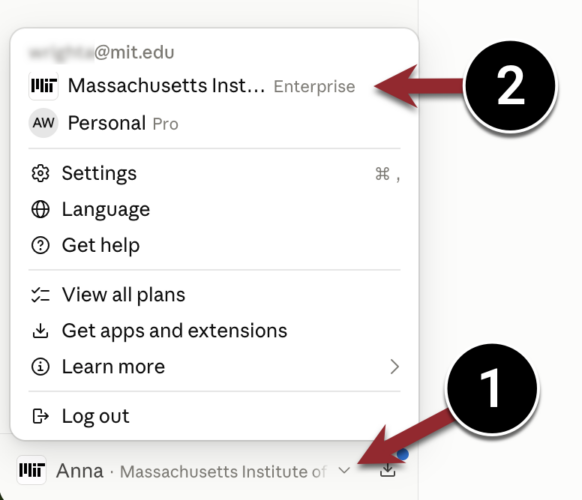
- After signing in, confirm that you are using your MIT Claude Enterprise account by opening the Account Menu [1] and selecting Massachusetts Institute of Technology Enterprise [2].
Account Migration
If you already have a Claude account using your MIT email address, you can wait to migrate it.
Your MIT Enterprise account works independently of any existing personal Claude account. You can start using MIT Enterprise today and decide later whether to move your personal account into it. If both accounts use the same email address, you can switch between them from the Account Menu.
We recommend waiting. Migration is not reversible, and we will publish full guidance on what moves, what doesn’t, and how to prepare. Nothing is lost by waiting.
Privacy & Security Considerations
Claude Enterprise at MIT is approved for use with research and administrative data classified as low or medium risk. It includes enhanced privacy and security protections, including data that is not used to train Claude’s models and enterprise-grade security built for institutional use.
When working with MIT information, follow MIT’s data handling and information protection requirements.
How to Get Support
MIT Sloan Technology Services
For questions about Claude Enterprise accounts, login issues, eligibility, or access, contact the STS Help Desk by emailing stshelp@mit.edu or calling 617-253-2000.
Anthropic
For help using Claude, including Cowork or Code, visit the Anthropic Help Center.
To learn more about Claude and its features, explore Anthropic’s free online courses, including Claude 101, Claude Code, and Cowork training.
Related Resources