
Description

Course Copilot is MIT Sloan’s AI-powered chatbot, designed to provide teaching teams with just-in-time course technology support right from their Canvas site. It helps save time by giving you quick answers, step-by-step guidance, and links to relevant resources without having to search through documentation.

Course Copilot is tailored to MIT Sloan’s supported teaching and learning tools and processes. It can also point you to the appropriate support team when you need additional help.

Who Can Use It

MIT Sloan teaching teams, including faculty, Primary Course Admins, and TAs.

Canvas Integration

Yes.
How to Get Access

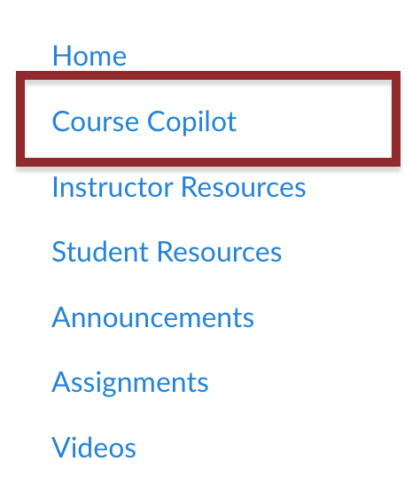
Note: Course Copilot is not enabled in the Course Navigation Menu by default. To enable it, go to Settings > Navigation. For step-by-step instructions, see How do I manage Course Navigation links?

  1. In your Canvas course, click Course Copilot in the Course Navigation Menu.
    Screenshot of Course Copilot in the Course Navigation Menu
  2. Use the chat interface to ask a question about Canvas or another supported tool.
  3. Review the response and follow any links or support instructions provided.

IMPORTANT: Course Copilot is AI-powered and still in beta, so it may make mistakes. Double-check important information, and reach out to our team anytime if you need help.

How to Get Support

MIT Sloan Teaching & Learning Technologies

Submit a support request for questions about Course Copilot or additional help with supported platforms and tools.

Related Resources