

Course technology questions often come up while you’re right in the middle of working in Canvas. Now, MIT Sloan teaching teams can get quick, just-in-time answers without leaving their course with Course Copilot, a new AI-powered support tool built directly into Canvas.
Setting up and managing course technology can involve a lot of questions: Where do I get started as a new member of the teaching team? How do I create a group assignment in Canvas? How do I set up attendance? Can I try out the classroom technology before my first class?
Instead of searching for answers across different resources, MIT Sloan teaching teams can now start with Course Copilot—a new AI-powered tool in Canvas designed to provide just-in-time course technology support. It gives you another way to get quick answers while you’re working in your course.
What is Course Copilot?
Course Copilot is now available in all MIT Sloan Canvas sites and is only available to members of the teaching team.
It provides quick answers, step-by-step guidance, and links to relevant resources. Built using Stack AI, Course Copilot is tailored to MIT Sloan teaching and learning technologies and processes.
When you need more help, Course Copilot can also point you to additional resources or the appropriate support team.
Example Questions
Course Copilot can help with common questions about Canvas and other supported tools.
For example, you might ask:
- “How do I copy content from a previous Canvas course?”
- “How do I publish a module?”
- “How do I add or remove a TA from my course?”
- “A student can’t access my Canvas site. What do I do?”
- “Students can’t access a file. What should I check?”
- “How do I request AV support?”
- “My Study.Net course pack isn’t loading. What should I do?”
For more complex, sensitive, or course-specific issues—such as hands-on troubleshooting, advanced tool questions, or special use cases—you can always submit a support ticket or request a consultation and connect directly with our team.
Getting Started
Note: Course Copilot is available in MIT Sloan Canvas sites but is not enabled in the Course Navigation Menu by default. To enable it, go to Settings > Navigation. For step-by-step instructions, see How do I manage Course Navigation links?
Once enabled, you can access Course Copilot directly from your Canvas course:
- Open your Canvas course.
- Click Course Copilot in the Course Navigation Menu.
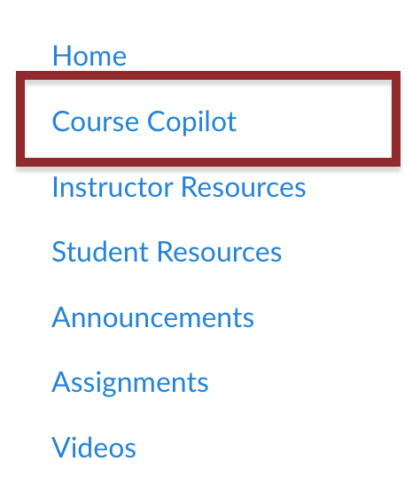
- Ask your course technology question in the chat.
- Review the response and follow any links or support instructions provided.
IMPORTANT: Course Copilot is AI-powered and still in beta, so it may make mistakes. Double-check important information, and reach out to our team anytime if you need help.
Share Your Feedback
Course Copilot is an experimental tool for Fall 2026, and your feedback will help us improve it throughout the pilot and shape future versions.
As you use Course Copilot, you can provide feedback directly on individual responses using the thumbs up or thumbs down buttons in the chat. We’ll also invite teaching teams to share broader feedback through a short survey midway through the Fall term.
Tell us what works, what doesn’t, and what questions you wish Course Copilot could answer. Your feedback will help us identify gaps, improve its answers, and make Course Copilot more useful for MIT Sloan teaching teams in future terms.
Need Help?
Our team in Sloan Technology Services (STS) is always here to help! Course Copilot is one of several ways to get support. You can also:
- Browse our website for how-to guides, tool overviews, and other resources.
- Attend a live training, watch an on-demand training video, or sign up for a practice session.
- Browse the Canvas Guides or contact Canvas Support 24/7 by phone or chat.
- Submit a support ticket or request a consultation.
Use whichever option works best for you. When in doubt, reach out!