
SKIP AHEAD TO
At a Glance
In this guide, you’ll learn how to get support with general questions as well as questions related to Sloan-specific tools in Canvas (e.g. Study.Net, Membership, Course Overview).
How to Get Help as an Instructor, Staff, and TA
Course Copilot
Course Copilot provides just-in-time, AI-powered help with common Canvas and course technology questions directly in your Canvas course.
It’s hidden by default and can be enabled under Settings in your Canvas site. Once enabled, use it to get step-by-step guidance and find relevant support resources while you work.
Canvas
Instructure provides 24/7 end-user support as part of MIT’s Enterprise license to faculty, staff, and teaching assistants by phone or chat.
You can also search the Canvas Guides to learn about the following:
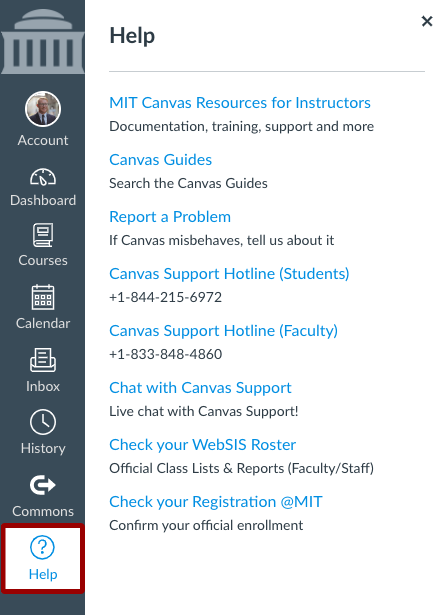
If you have questions about using Canvas and its features, you can get help by using the Help menu in the Global Navigation Menu:
MIT Sloan Teaching & Learning Technologies
Submit a support request for any questions related to Sloan-specific tools, including:
Canvas Access & Enrollments
See How to Manage Your Roster in Canvas for more information and support resources.
How to Get Help as a Student
Instructure provides 24/7 end-user support as part of MIT’s Enterprise license to students by phone or chat.
You can also search the Canvas Guides to learn about the following:
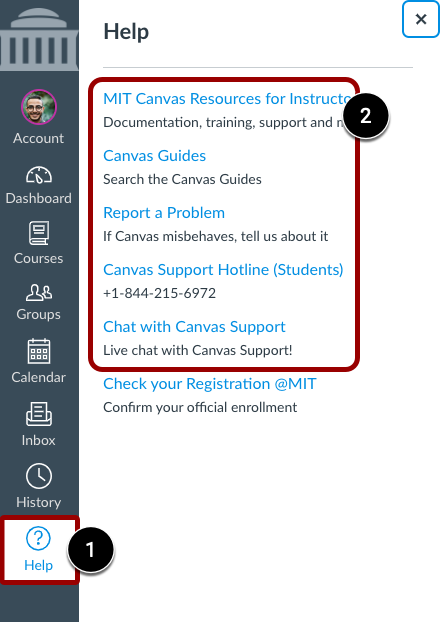
If you have questions about using Canvas and its features, you can get help by using the Help menu [1] in the Global Navigation Menu and clicking on the Canvas Guides, the support hotline, or live chat [2]:
Canvas Access & Course Registration
See FAQ: Course Registration and Canvas Access for answers to common questions about course registration, enrollment changes, and access to Canvas sites.
Still Need Help?
We’re always happy to hear from you! You can reach us directly by sending a message to our team.