At a Glance
Peerceptiv supports Team Member Evaluations in courses that use group work. Students can reflect on their own contributions, provide feedback to teammates, and assess overall team performance.
This guide highlights what teaching teams most often need to know when using Peerceptiv—how to choose the right setup option and how to review student progress and results.
We’re piloting Peerceptiv in select courses in Spring, Summer, and Fall 2026. This page contains information for courses that are taking part in the pilot program.
Note: Option 1 is the most common setup for courses using Peerceptiv.
View Progress
Once your Team Member Evaluation is published, Peerceptiv allows you to monitor progress. To check on how students are doing:
- Open your evaluation in Peerceptiv.
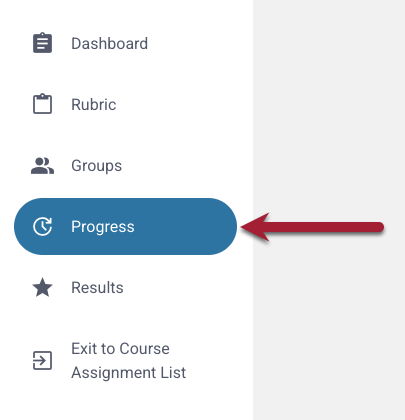
- Click Progress in the Assignment Menu.
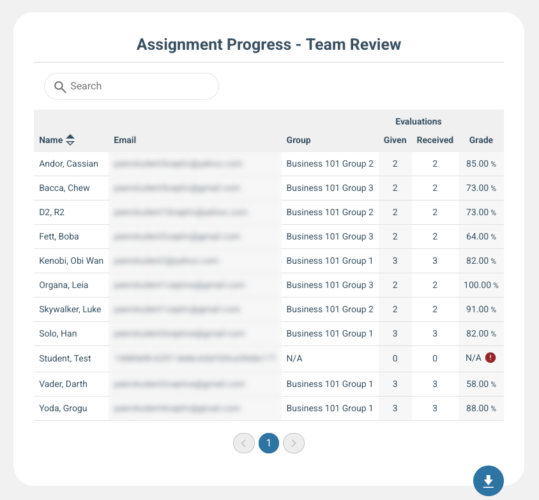
- From the Progress page, you can:
- See which students have completed their evaluations
- Click any student’s name to view:
- The feedback they’ve given
- The feedback they’ve received
- View a student’s grade once results have been released
To learn more, see Peerceptiv’s documentation.
Understand, Release, & Export Results
After your Team Member Evaluation closes, Peerceptiv gives you tools to review results, control what students see, and export data for your records.
If you need to release results, adjust visibility, override individual grades, or download evaluation data, see How to Review, Release, and Export Team Member Evaluation Results in Peerceptiv.
Get Support
Peerceptiv
Peerceptiv provides end-user support as part of MIT Sloan’s Enterprise license. You can:
MIT Sloan Teaching & Learning Technologies
Request a consultation with a member of our team to learn how to integrate and use Peerceptiv in your course.
Related Resources